


| List Number: | PLT.156 |
| Manufacturer: | Delta |
| Price excluding VAT: | 289,26 CZK |
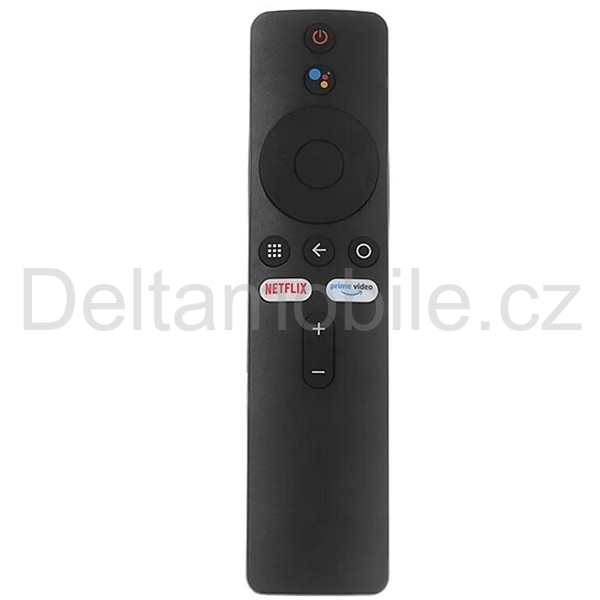
The Xiaomi XMRM-00A replacement remote control is designed for compatible Xiaomi Smart TV televisions, Mi Box multimedia players and Mi TV Stick devices. Bluetooth communication allows convenient control without having to point the remote directly at the device.
The built-in microphone supports voice control and search. After pressing the voice button, you can search for movies, series, apps or other supported content without the lengthy text entry using directional buttons.
The remote offers a virtual keyboard and a dedicated Netflix button for quick launch of this streaming app. Before first use, the remote must be paired with the television or multimedia player.
Technical specifications
Product type: Replacement remote control
Remote model: XMRM-00A
Communication method: Bluetooth
Voice control: Yes
Voice search: Yes
Built-in microphone: Yes
Virtual keyboard: Yes
Netflix button: Yes
Power: 2× AAA batteries (not included)
Designed for: Compatible Xiaomi Smart TV, Mi Box and Mi TV Stick
Available variants: Without batteries or including batteries
Compatible Xiaomi televisions
-
Xiaomi L32M5-5ASP
-
Xiaomi L43M5-5ASP
-
Xiaomi L55MS-5A
-
Xiaomi L65M5-5ASP
-
Xiaomi Mi TV 4A
-
Xiaomi Mi TV 4S
-
Xiaomi Mi TV 4X
-
Xiaomi Mi TV 4X Ultra HD Android TV
-
Xiaomi Mi TV P1
-
Xiaomi Mi TV Q1
-
Xiaomi Mi TV Q1E
Compatible multimedia players
-
Xiaomi Mi TV Stick
-
Xiaomi Mi TV Stick 4K
-
Xiaomi Mi Box
-
Xiaomi Mi Box S
-
Xiaomi Mi Box 4S
-
Xiaomi Mi Box 4K
Main benefits
-
Wireless control via Bluetooth
-
Built-in microphone
-
Voice control and search
-
Virtual keyboard
-
Dedicated Netflix button
-
Suitable as a replacement for a damaged or lost remote
-
Compatibility with selected Xiaomi televisions and players
-
Choice of variant without batteries or including batteries
Pairing instructions
-
Turn on the Xiaomi TV, Mi Box or Mi TV Stick manually.
-
Insert two AAA batteries into the remote. (not included)
-
Bring the remote close to the device, at a distance of approximately 20–30 cm.
-
Wait to see whether pairing instructions appear automatically on the screen.
-
If they do not appear, press the Mi and Home buttons at the same time.
-
Hold both buttons for about 5 seconds.
-
Complete the pairing according to the instructions shown on the screen.
Important before ordering
The Xiaomi designation or the presence of Android TV does not automatically guarantee compatibility. Xiaomi uses several types of Bluetooth remotes across different generations of TVs, Mi Boxes and Mi TV Sticks.
Before ordering, compare the model marking on your original remote and the exact device model with the compatibility list. Pay special attention to the XMRM-00A marking and to the button layout and appearance.
This is a replacement compatible remote. Bluetooth pairing is required before first use. The availability of voice features may also depend on the system, regional settings and supported apps on the connected device.
Package contents
The package contents depend on the selected variant:
-
Xiaomi XMRM-00A replacement remote control
FAQ
Is the remote an original Xiaomi product?
No. This is a replacement compatible remote control designed for selected Xiaomi devices.
Do I need to pair the remote before use?
Yes. The remote communicates via Bluetooth and must be paired with the TV, Mi Box or Mi TV Stick before first use.
How do I start Bluetooth pairing?
Bring the remote close to the powered-on device to a distance of 20–30 cm. If pairing does not start automatically, press and hold the Mi and Home buttons together for about 5 seconds.
Does the remote support voice search?
Yes. The remote has a built-in microphone and supports voice control and search on compatible devices and apps.
Is it compatible with all Xiaomi televisions?
No. Compatibility must be verified according to the exact TV model and the marking of the original remote.
Does it work with Xiaomi Mi Box S?
Yes, Xiaomi Mi Box S is listed among the compatible devices. Bluetooth pairing is required before use.
Does it work with Xiaomi Mi TV Stick?
Yes, it is designed for compatible versions of Xiaomi Mi TV Stick and Mi TV Stick 4K.
Are batteries included?
The product is available in a battery-free variant and in a variant including batteries. Please select the required set before adding to cart.

Batteries vs Rechargeable Batteries: Runtime and Lifespan
Why can an ordinary battery last a year in a TV remote, while a rechargeable battery may need charging much sooner? Does that mean the rechargeable battery is worse? Not at all. Disposable batteries and ...
Read whole
How to Choose a Remote Control: Complete Guide to Choosing the Right One
How to Choose a Remote Control: Complete Buying Guide Have you lost your remote control, has it stopped working, or do you need a replacement? Choosing the right remote control does not have to be difficult. ...
Read whole
How to Calibrate a Laptop Battery
Before use, the battery should be calibrated so that it works correctly. Laptop batteries have a relatively short service life. You should take care of the battery so that it lasts as long as possible. ...
Read whole
Replacement Chart for Silver Oxide and Alkaline Batteries
napětí [V] průměr výška [mm] Energizer AWI Bulova Duracell Maxell Panasonic Rayovac Renata Sanyo Sony Toshiba Seiko Varta jiný 1,5 11,60 ...
Read whole








Deltamobile S.R.O.
Ovenecka 348/36,
17000 Praha 7,
Česká republika


