


| List Number: | PLUC.082 |
| Manufacturer: | HUAYU |
| Price excluding VAT: | 206,61 Kč |
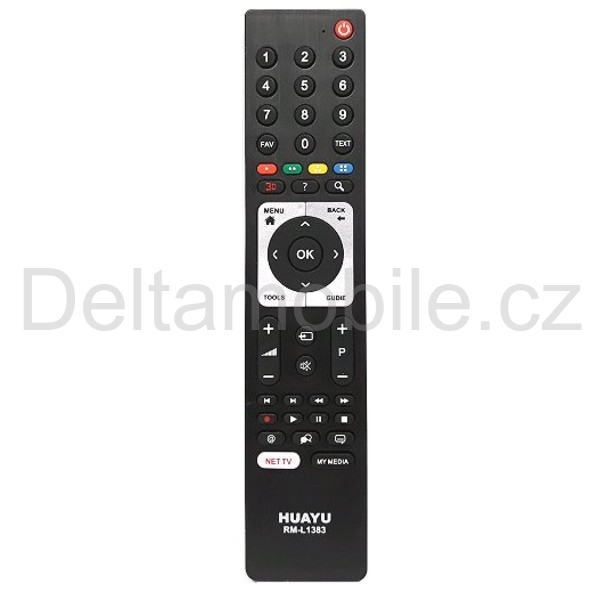
HUAYU RM-L1383 universal remote control for Grundig, Beko and ECG LCD/LED TVs.
This quality HUAYU remote replaces original Grundig TV remote controls. It requires no setup or code entry and retains all functions of the original remote. Simply insert the batteries and start using it. Batteries are not included.
Provides 100% compatible control of Grundig TVs.
Compatible models:
TP7, 6X8187, 7P7187, 7TP7187, XLX187R, RCH5J52, RC-GD1, YD1187R, RC19949906, TP3, RM-4280, RM-080, RC-YE1, RM-283C, RM-906C, RC52031, RC12.3, RC12.4, RC12.5, RC12.6, RC12.8, RC14.1, RC14.2, RC14.4, 7X1187, X65187, YG1187, TP715, TP750C
Instructions for using the HUAYU RM-L1383 remote control
Insert 2 AAA batteries into the remote and test it with your TV. If all functions work correctly, no programming is required and the remote can be used immediately.
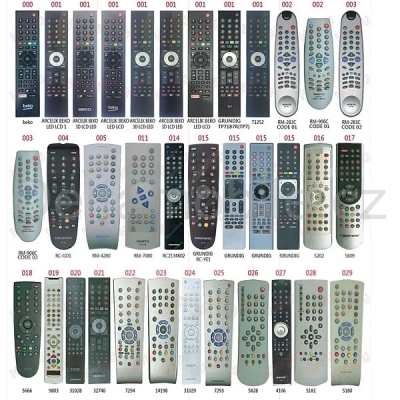
If the remote does not work correctly or some functions are unavailable, try programming it by entering the code for the corresponding remote control. Follow the procedure below and use the supplied remote-control code table.
PROGRAMMING BY CODE
1. Switch the TV on manually so that it is operating. Find the code corresponding to your original remote in the “Code table”.
2. Press the “POWER” and “IMPUT” buttons simultaneously until the indicator lights up. Release the buttons and enter the appropriate code. The entered code is automatically stored in memory.
3. Check all remote-control functions on your TV. If it does not work correctly, repeat the procedure above and try another code.
AUTOMATIC CODE SEARCH
1. Switch the TV on so that it is operating and point the remote at it.
2. Press and hold the “POWER” button for at least 6 seconds until the indicator starts flashing. The remote now cycles through the codes automatically. Keep holding the “POWER” button. As soon as the volume control appears on the TV, release the button immediately; the indicator will go out and the selected code will be stored.
3. Test the remote with the TV. If some functions do not work, repeat step 2 to find the next code.

How to Choose a Remote Control: Complete Guide to Choosing the Right One
How to Choose a Remote Control: Complete Buying Guide Have you lost your remote control, has it stopped working, or do you need a replacement? Choosing the right remote control does not have to be difficult. ...
Read whole
How to Calibrate a Laptop Battery
Before use, the battery should be calibrated so that it works correctly. Laptop batteries have a relatively short service life. You should take care of the battery so that it lasts as long as possible. ...
Read whole
Replacement Chart for Silver Oxide and Alkaline Batteries
napětí [V] průměr výška [mm] Energizer AWI Bulova Duracell Maxell Panasonic Rayovac Renata Sanyo Sony Toshiba Seiko Varta jiný 1,5 11,60 ...
Read whole
How to Choose a Primary (Non-Rechargeable) Battery?
Batteries for end consumers can, in simplified terms, be divided into two main groups. Although this classification is not entirely technical, they can be divided into standard and special batteries. Standard ...
Read whole








Deltamobile S.R.O.
Ovenecka 348/36,
17000 Praha 7,
Česká republika


